How to Submit Total Freight Costs After Delivery
Once a shipment has been delivered, carriers can submit their Total Freight Costs to the shipper for approval directly in Evotrux. This helps both sides agree on the final charges before accounting teams get involved, reducing invoice disputes, back-and-forth emails, and payment delays.
Written By Daniel Santos
Last updated 4 months ago
What are Total Freight Costs?
Total Freight Costs are the final freight charges for a delivered shipment.
They include:
The original booked price
Any additional approved charges
Any rebates or deductions
Optional notes for the shipper
The goal is to make sure the carrier and shipper operations teams agree on the final amount before an invoice is sent.
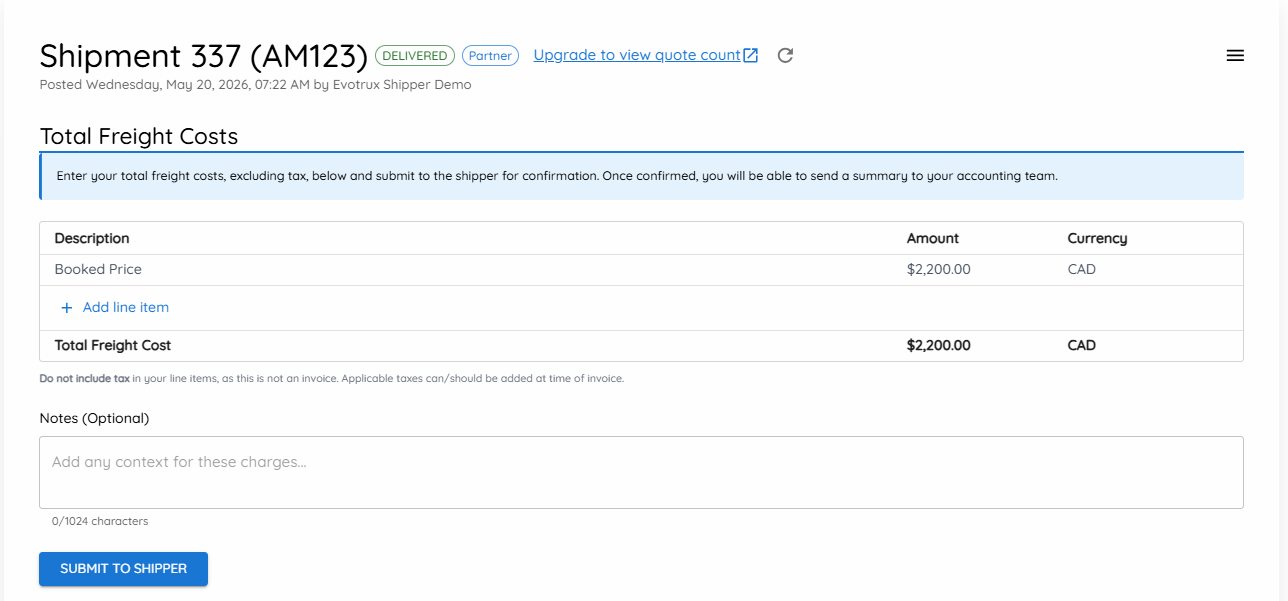
When can I submit Total Freight Costs?
You can submit Total Freight Costs after the shipment has been marked as Delivered in Evotrux.
Once the load is delivered, you will see the Total Freight Costs section appear at the top of the shipment page.
How to submit Total Freight Costs
1. Review the booked price
The original booked price will automatically appear as the first line item.
This amount cannot be edited.
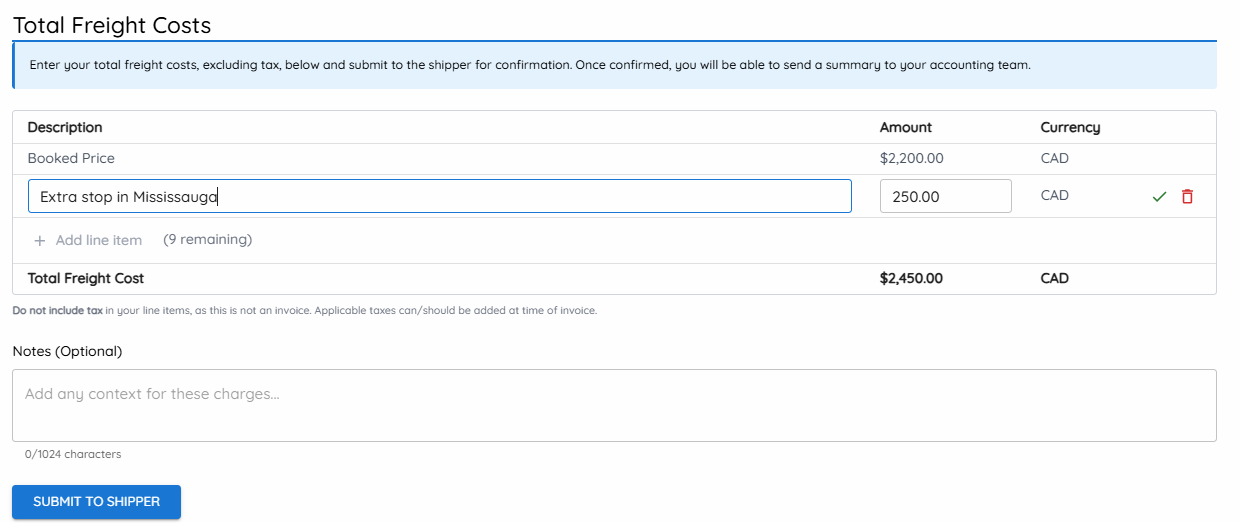
2. Add any additional line items
If there are extra charges, click Add line item.
For each line item, enter:
A description
The amount
The currency
Examples of additional line items may include:
Extra stop
Detention
Layover
Driver assist
Rebate or discount
Line items can also be entered as negative amounts if you need to apply a rebate, discount, or deduction.
3. Add an optional note
You can include a note with your submission to give the shipper additional context.
For example:
Extra stop was approved in chat.
This note will be visible to the shipper when they review your Total Freight Costs.
4. Submit to the shipper
Once your charges are complete, click Submit to Shipper.
You will be asked to confirm the total amount before submitting.
After you confirm, the shipper will be notified and asked to review the Total Freight Costs.
What happens after I submit?
After you submit your Total Freight Costs, the shipper can either:
Approve the charges
Request changes
The Total Freight Costs remain open until approval.
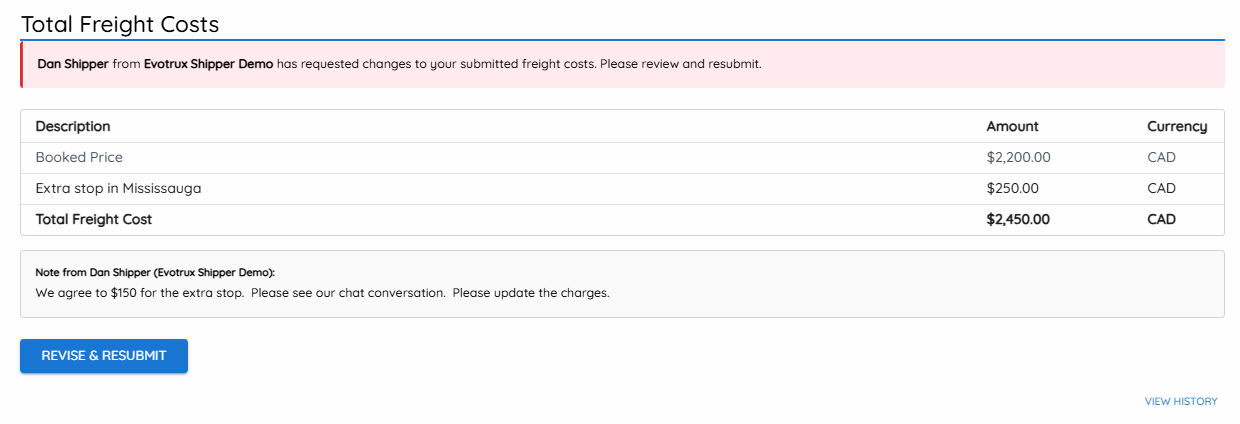
If the shipper requests changes
If the shipper requests changes, you will see a message explaining what needs to be updated.
You can then edit your Total Freight Costs and resubmit them for approval.
This process can continue until both sides agree on the final amount.
Once the shipper approves
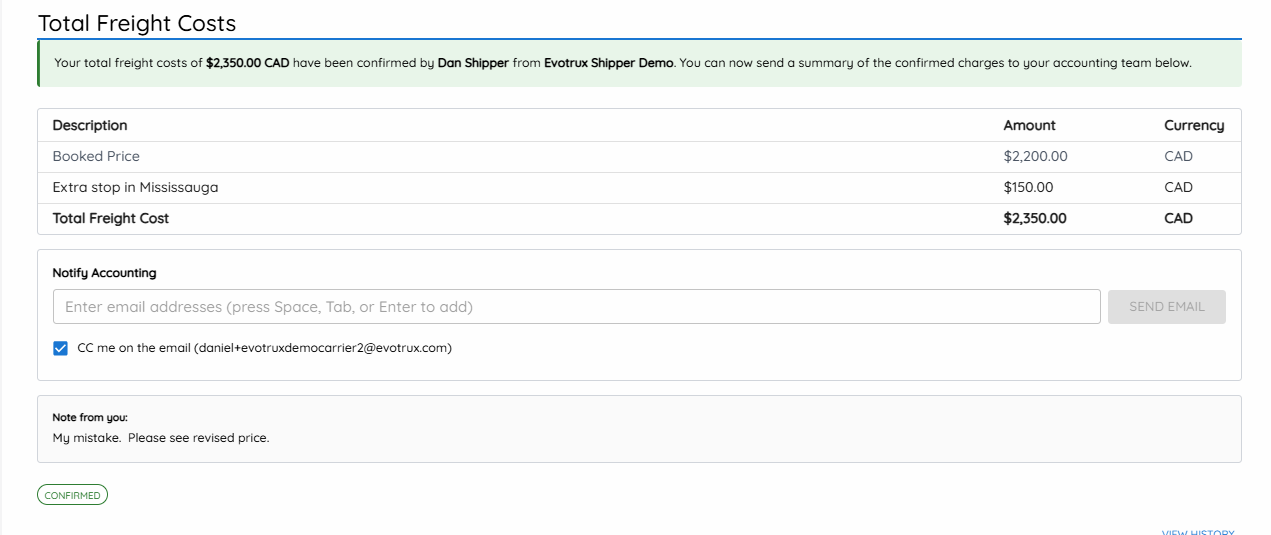
Once the shipper approves the Total Freight Costs, the charges are confirmed.
At this point, you can send an email summary of the approved Total Freight Costs to your accounting team directly from Evotrux.
This gives your accounting team the final agreed-upon freight charges so they can prepare the invoice and add any applicable taxes.
Important notes
Taxes should not be included in your Total Freight Cost line items.
The booked price is included automatically and cannot be edited.
Additional charges should be entered as separate line items.
Negative line items can be used for rebates or deductions.
The shipper must approve the Total Freight Costs before they are considered confirmed.
Once approved, you can notify your accounting team by email.
Why this matters
Without Total Freight Costs, freight payment issues are often handled after the invoice is sent.
That usually creates a reactive loop:
The carrier sends an invoice. The shipper accounting team compares it against their internal records. If the amounts do not match, they need to check with their operations team. The shipper then contacts the carrier accounting team, who may need to check with their own operations team. This can delay payment and create unnecessary back-and-forth.
Total Freight Costs help avoid that.
By having the carrier and shipper operations teams agree on the final charges before accounting gets involved, both accounting teams can work from the same approved amount.
The result is a cleaner invoice process, fewer disputes, and faster payment approvals.
Frequently asked questions
Can I edit the booked price?
No. The booked price is automatically included and cannot be edited.
If the final freight cost changed, add a separate line item to explain the adjustment.
Can I add more than one line item?
Yes. You can add multiple line items for additional charges, deductions, or rebates.
Can I enter a negative amount?
Yes. Negative line items can be used for rebates, discounts, or deductions.
Can I include taxes?
No. Do not include tax in your Total Freight Costs. Applicable taxes should be added later when the invoice is prepared.
What if the shipper does not approve my submission?
The shipper can request changes. You can then edit your Total Freight Costs and resubmit them.
When should I send the summary to accounting?
Only after the shipper has approved the Total Freight Costs.
That way, your accounting team receives the final agreed-upon charges.